


IQOS ILUMA Indicator Lights Explained: White, Red and Blinking Lights

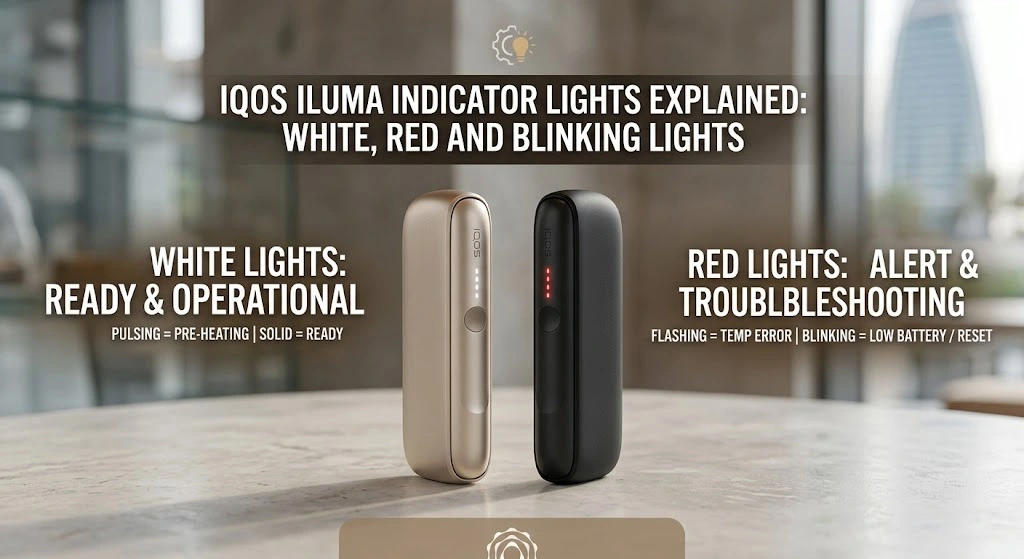
Picture this: You are sitting at a cozy outdoor café overlooking the Dubai Fountain, or perhaps unwinding on your balcony after a busy day in Sharjah, Ajman, or Abu Dhabi. You reach for your IQOS ILUMA, press the button, expecting that familiar, smooth warm-up, but instead of the usual gentle pulsing light, your device starts flashing an unfamiliar pattern or blinking red.
Suddenly, your relaxing moment hits a minor speed bump. Is the battery dead? Did the device overheat in the warm UAE summer air? Or does it just need a quick reset?
As smoke-free alternatives continue to gain immense popularity across the UAE, the IQOS ILUMA series has become a daily companion for thousands of adults seeking modern heated tobacco experiences. Powered by advanced heat-not-burn technology, these sleek devices swap traditional combustion for smart induction heating. However, because the ILUMA doesn’t feature a digital screen, it relies entirely on a subtle, elegant system of LED lights to communicate its status to you.
Understanding what these light signals mean is the secret to keeping your experience smooth, predictable, and hassle-free. Whether you buy from your favorite local shop or rely on an online vape and tobacco alternative store, this guide will walk you through every light code on your IQOS ILUMA in plain, easy-to-understand language. Think of this as a conversation with a knowledgeable friend who knows the ins and outs of your device!
1.IQOS ILUMA Indicator Lights Explained: What Your Device Is Telling You
Your IQOS ILUMA has no screen, so it talks through light. Here’s how to read it in seconds.
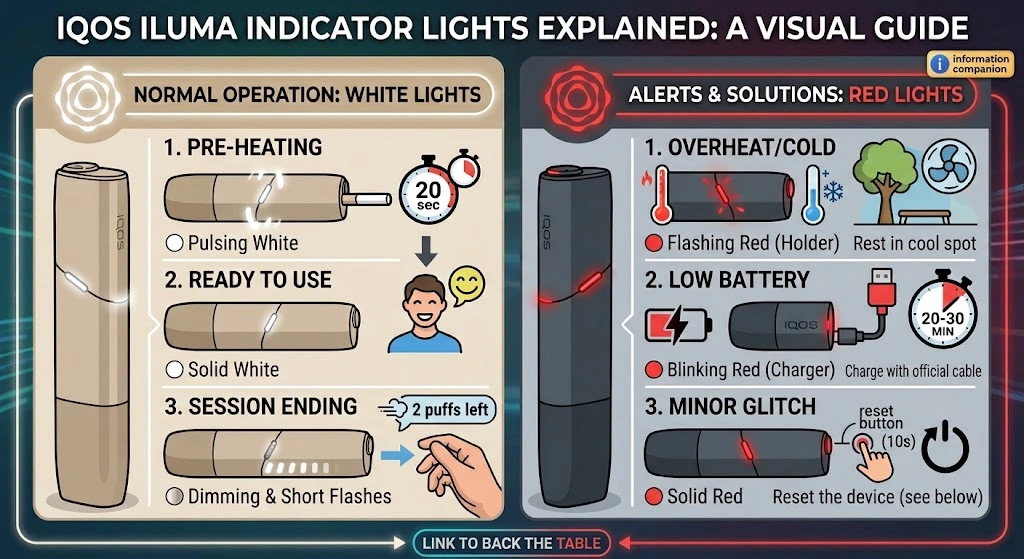
| Light | What it means | What to do |
|---|---|---|
| ⚪ Pulsing white | Pre-heating (about 20 seconds) | Wait for it to turn solid |
| ⚪ Solid white | Ready to use | Enjoy your session |
| ⚪ Dimming or short flashes | Session ending (30 seconds or 2 puffs left) | Finish up and remove the stick |
| 🔴 Flashing red (Holder) | Too hot or too cold | Rest it in a shaded, cool spot for 10-15 minutes |
| 🔴 Blinking red (Charger) | Battery too low | Charge with an official USB-C cable for 20-30 minutes |
| 🔴 Solid red | Minor glitch | Reset the device (see below) |
2. The IQOS ILUMA Light System Overview: How Your Device Speaks to You
Unlike older devices with complex displays, the IQOS ILUMA relies on intuitive light patterns displayed on the Holder and the Pocket Charger. These lights are your device’s way of telling you everything—from how much battery life remains to whether your stick is properly heated or if the device is feeling a bit too warm under the UAE sun.
The ILUMA series—whether you hold the standard ILUMA, the compact ONE, or the premium PRIME—uses two primary light colors: White and Red.
- White Lights represent standard operational states: charging, pre-heating, ready-to-use, and session endings.
- Red Lights signal alerts, operational errors, extreme temperature triggers, or hardware issues requiring a quick fix or reset.
By learning these visual cues, you can instantly tell what your device needs without guessing. Let’s start by breaking down the most common light signals you’ll see every day: the white lights.
3. White Lights Decoded: Smooth Signals for Every Session
When your IQOS ILUMA displays white lights, it generally means things are working normally. However, different light patterns—pulsing, solid, or quick flashes—tell distinctly different parts of the story.
Steady White Light: Ready for Action
When you insert a stick or check your device’s status and see a steady, solid white light, your device is fully operational and ready to use.
- On the Pocket Charger, solid white lights indicate the current battery charge level when you tap the button. Four full lights mean 100% charged, while fewer lights signal that it’s time to recharge soon.
- On the Holder, a solid white light means the stick has finished heating up and your session can begin.
Gently Pulsing White Light: Pre-Heating in Progress
When you insert a compatible stick into your Holder, the induction system engages automatically (or when you press the button). The light on the Holder will begin to pulse white smoothly.
- What it means: The device is actively heating the stick to the precise target temperature.
- What to do: Simply wait about 20 seconds. You will feel a subtle vibration and see the light turn solid white, signaling that your session is ready.
Shopping Tip: If you want to learn more about compatible tobacco sticks, explore our TEREA stick collection to see the available options.
Short White Flashes or Dimming Lights: Session Ending Alert
Towards the end of your experience, you will notice the white lights on the Holder start to dim, flash briefly, or vibrate twice.
- What it means: Your session has 30 seconds or 2 puffs remaining.
- What to do: Finish up your session gently. Once the light turns off completely, remove the spent stick.
Rapid White Flashes: Battery Status & Connection Check
If you see white lights rapidly blinking on your Pocket Charger when you slide the Holder inside:
- What it means: The Pocket Charger is actively communicating with or charging the Holder.
- What to do: Give it a minute or two. If the Pocket Charger itself is low on battery, plug it into an original USB-C charger.
4. Red and Blinking Lights Decoded: Simple Fixes for UAE Users
It can be alarming when your smooth white light suddenly switches to a bright red blink, but don’t panic! A red light rarely means your device is broken. In most cases, it is simply a helpful protective measure or a polite reminder for a battery top-up.
Flashing Red Light on the Holder: Temperature Limits in the UAE Climate
One of the most frequent reasons for a flashing red light in places like Dubai, Abu Dhabi, Sharjah, or Ajman is temperature sensitivity.
The IQOS ILUMA is engineered to perform optimally within an ambient operating range of 0°C to 40°C (32°F to 104°F).
- The UAE Scenario: Leaving your IQOS ILUMA in a hot car parked outside during a summer afternoon in Abu Dhabi or on an exposed table at a beach lounge in Dubai can quickly push the internal sensors past 40°C.
- What to do: Move your device into a cooler, shaded environment (like an air-conditioned room or car). Let it rest naturally for 10–15 minutes. Never place it in a refrigerator or near ice, as sudden moisture condensation can permanently damage internal electronics. Once cooled back down to normal room temperature, press the button again—the red light will usually vanish.
Similarly, if you move directly into an intensely air-conditioned space after being outdoors, temperature shocks can occasionally trigger a brief red warning. Letting the device adjust for a few minutes resolves this instantly.
Blinking Red Light on the Charger: Deep Battery Depletion
If your Pocket Charger is flashing red, the battery level has dropped below the minimum threshold required to initiate a heating cycle.
- What to do: Connect your Pocket Charger using an official power adapter and USB-C cable. Allow it to charge uninterrupted for at least 20–30 minutes before trying to use it again. Avoid using unverified low-quality charging cables, as inconsistent voltage can trigger light glitches.
Solid Red Light or Persistent Red Flashing: Performing a Quick Reset
If the light stays solid red or continues to blink red even after cooling down and charging, your device’s operating software may have encountered a minor glitch. Performing a manual reset fixes almost all minor electronic hiccups.
How to Reset Your IQOS ILUMA (Step-by-Step):
- Place the Holder securely inside the Pocket Charger.
- Press and hold the button on the Pocket Charger for 10 seconds.
- Release the button. All lights will turn off, flash briefly, and then turn back on white.
- Done! Your device has successfully rebooted, clearing out any minor sensor errors.
If you happen to use the compact IQOS ILUMA ONE, simply hold its single main button down for 10 seconds until all lights turn off and cycle back on.
If a reset doesn’t resolve the solid red light after multiple attempts, it may indicate a hardware fault. If you are using one of the latest IQOS ILUMA series models, contacting official support or visiting a reputable specialist is your best next step.
5. Practical Maintenance & Care: Keeping Light Errors at Bay
One of the best upgrades in the IQOS ILUMA series compared to older generations is the introduction of SMARTCORE INDUCTION SYSTEM™ technology. Because there is no heating blade inside the holder, you no longer have to scrub away baked-on tobacco residue or worry about snapping delicate heating blades!
However, minimal maintenance is still key to preventing random connection light errors:
- Inspect the Charging Contacts: Over time, dust, pocket lint, or tiny particles can gather inside the bottom of the Pocket Charger or on the gold contacts of the Holder. If the contacts can’t connect cleanly, the charger light may flash white or red. Gently wipe the connection points with a dry cotton swab once every couple of weeks.
- Keep the Auto-Start Sensor Clear: The ILUMA features an optical sensor that detects when a stick is inserted. If dirt builds up near the top opening of the holder, auto-start might hesitate or trigger abnormal light patterns. Keeping the opening clean ensures instant stick detection every time.
- Store Smartly in the UAE: Avoid leaving your device on car dashboards, near windows exposed to direct sunlight, or in high-humidity areas for prolonged periods. Storing your device at comfortable indoor room temperatures ensures battery longevity and keeps your lights glowing steady white.
Frequently Asked Questions
1. What does a flashing red light mean on my IQOS ILUMA?
It usually signals that your device is too hot from the UAE climate or needs a battery charge. Let it cool in a shaded area or plug it into an official charger.
2. How do I reset my IQOS ILUMA when it shows persistent red lights?
Place the Holder in the charger and press the button for 10 seconds (or hold the ILUMA ONE button for 10 seconds). This reboots the device and clears glitches.
3. Why is my IQOS ILUMA pulsing white?
A pulsing white light means the device is currently pre-heating your stick. It will turn solid and vibrate when it’s ready to use.
4. Do I still need to clean my IQOS ILUMA heating blade?
No, the ILUMA uses blade-free induction heating so there is no blade to clean. Just keep the charging contacts clear of dust and lint.
5. Can I use my IQOS ILUMA right after charging it in a hot car?
It is best to wait until it cools down to room temperature. Using it while overheated may trigger safety red lights.
6. Summary Wrap-Up: Smooth Sailing with Your IQOS ILUMA
Understanding your IQOS ILUMA’s indicator lights is the simplest way to ensure a seamless, enjoyable experience wherever you are in the Emirates.
- White lights are your day-to-day friends—guiding you through pre-heating, active sessions, and battery checks.
- Red lights are gentle reminders—asking you to cool the device down from the UAE heat, plug in for a charge, or perform a 10-second reset.
By taking care of your device and keeping it away from extreme temperatures, you can enjoy a consistent experience whether you’re relaxing at home in Sharjah or Ajman or out on the town in Dubai or Abu Dhabi.
Looking to explore new accessories, discover fresh flavor options, or upgrade your current device setup? For delivery inquiries or order assistance, contact our team for more information and check out everything you need at rpodstore.ae—your trusted destination to explore our heating device collection and keep your smoke-free journey hassle-free!